
Set up a Shopify wholesale login rule so only customers with the right tag can buy selected products. You can use the same approach for Shopify members only products, or require login without checking a tag.
Before you start
You need an active BlockCart subscription to save a rule. Choose the products to protect and the customer tag that grants access, such as Wholesale.
Allow only tagged customers to buy selected products
- On the BlockCart home page, select Create new rule. In the dialog, select Cart and checkout validation.
- Enter a Rule name. Under Rule input, choose Standard input.
- Under Eligibility, select Only when conditions match. In the first group, set Cart contains to at least one selected product. Select Select products and pick the protected products.
- Select Add condition (AND) in that group. Choose Customer is not logged in and leave its value set to
true. This group blocks guests with a protected product. - Select Add group (OR). In the new group, repeat Cart contains → at least one selected product and select the same products.
- Select Add condition (AND) in the second group. Choose Customer tag → does not have any of, then enter
Wholesale. This group blocks signed-in customers who lack the tag. - Write an Error message that works for both groups, such as “Sign in with a wholesale account to buy this product.” Set Status to Live, then Save. Test as a guest, a signed-in customer without the tag, and a signed-in customer with it.
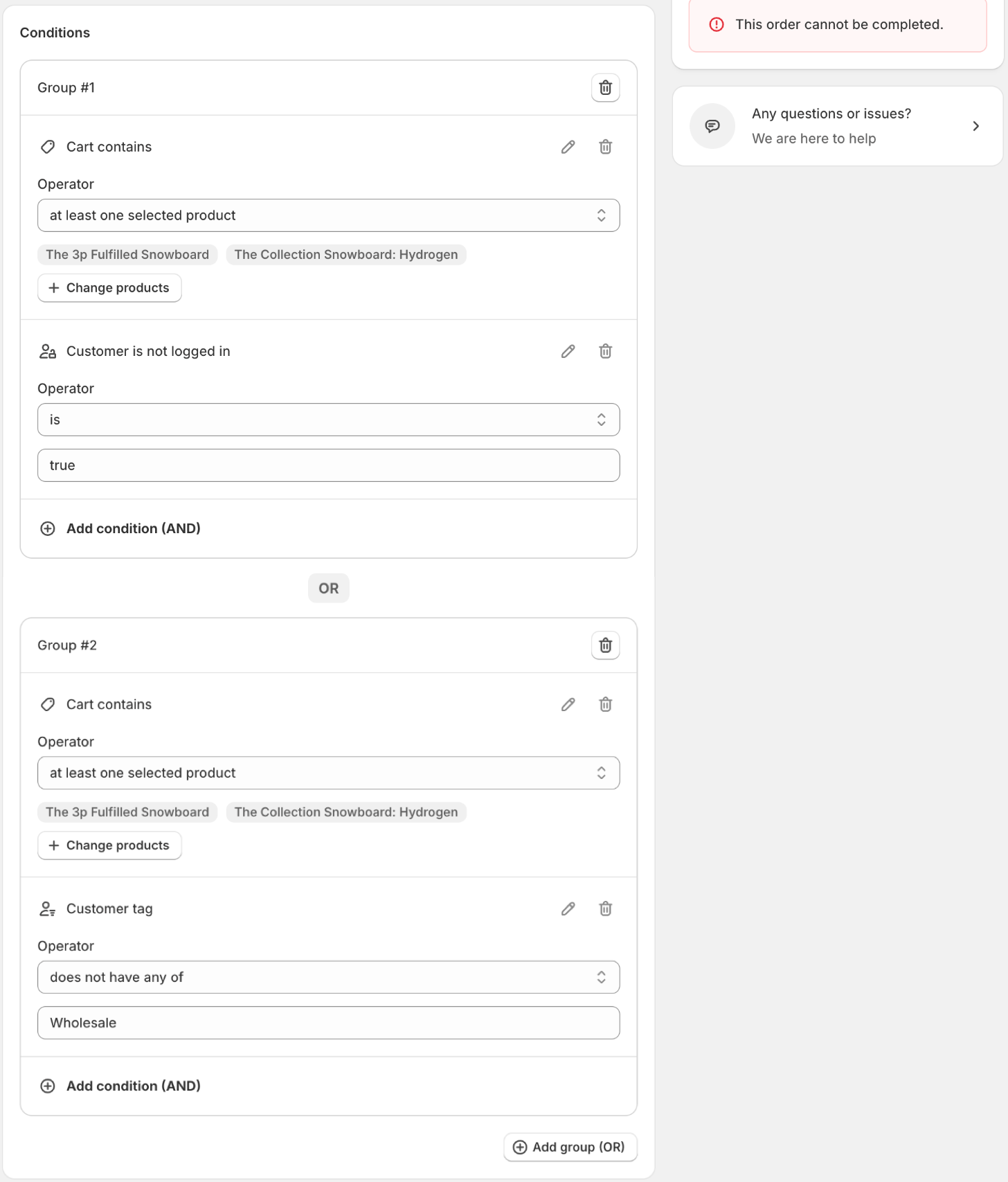
Example
| Rule input | Conditions | Error message |
| ------------------ | ------------------------------------------------------------------------------------------------------------------------------------------------------------------------------------------------------------------------------------------------------------------------------ | ----------------------------------------------------- |
| Standard input | Group 1: Cart contains → at least one selected product: wholesale product AND Customer is not logged in<br>OR<br>Group 2: Cart contains → at least one selected product: wholesale product AND Customer tag → does not have any of Wholesale | Sign in with a wholesale account to buy this product. |
Good to know
- This rule does not hide the products from your storefront or stop customers adding them to the cart. It stops the order at Shopify checkout. To hide products or prices, use your theme or a separate wholesale app.
- A guest does not match Customer tag, even with does not have any of. Keep the guest group if you want to block guests as well as signed-in customers without the tag.
- To use this as a Shopify require login rule for selected products, keep only the first group. Any signed-in customer can then buy them, regardless of tag.
- Conditions within a group are AND. Groups are OR. A rule allows up to four groups, and the same error message appears whichever group matches.
- Rule input is locked after creation. Product selections belong to your store; select products again if you import this rule into another store.